Home / 3D Scanners / How to Choose a 3D Scanner in Malaysia

How to Choose a 3D Scanner in Malaysia (and What Drives the Price)

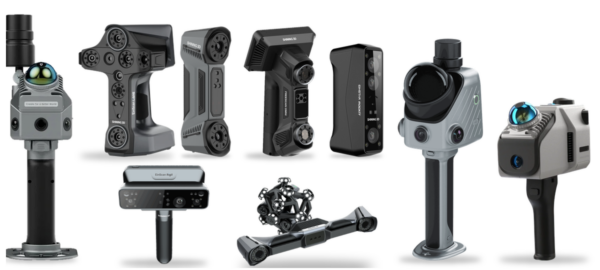
The right 3D scanner depends on what you do with the data, not on the headline accuracy number. Reverse engineering for CAD needs a clean mesh and a workable scan area. Inspection against a CAD model needs traceable accuracy. Scanning a building needs LiDAR range. MAKE3D is the Official Distributor of Shining 3D, FJD Trion and 3DMakerPro in Malaysia, so we can put metrology, professional and LiDAR scanners side by side on your own part, with entry-level options for smaller jobs. Tell us the part size, the tolerance and the deliverable on WhatsApp and we will narrow the field to two or three models.

How much does a 3D scanner cost in Malaysia?

Cost is set by five things: the accuracy class, how large an area the scanner covers, whether it tracks itself or needs markers, which software is included, and the support behind it. We do not publish prices, because the final figure depends on the package. A quote lists the scanner, software licences, accessories, training and warranty separately.

  • Accuracy class: entry-level scanners state resolution; metrology scanners state accuracy and volumetric accuracy, and cost more.
  • Coverage and speed: wider scan area and more laser lines capture faster, which matters for larger parts.
  • Tracking and standalone computing: optical tracking and on-board processing add hardware.
  • Software: inspection, reverse-engineering and point-cloud software are separate licences on some models.
  • Support: demo, training, local repair and servicing, and a 1-year warranty.

Ask for a quote or demo on WhatsApp and we will price the package that fits your work.

Which tier fits your application?

Match the tier to the job first, then pick the model. The table shows the four tiers we supply, with the figures stated on each product page (manufacturer values; accuracy, resolution and volumetric accuracy are different measures, so do not read the table as a head-to-head test).

TierBest forModels we listStated figures
Metrology (inspection)First-article and incoming inspection, GD&T, tight tolerancesFreeScan Omni; Combo+ Wireless; Trio; UE Pro 2; Trak Nova0.02 mm stated accuracy on the Omni, Combo+ Wireless and Trio; volumetric 0.02 mm + 0.015 mm/m with photogrammetry on the Omni and UE Pro 2; Trak Nova: optical tracking, 2.6 x 2.2 m field of view
Professional (reverse engineering, design, colour)Scan-to-CAD, replacement parts, product designEinScan Rigil (our pick); EinScan LibreRigil: volumetric 0.04 + 0.06 mm/m, resolution up to 0.05 mm, standalone, wireless PC and wired modes, 5 MP texture camera. Libre: volumetric up to 0.04 + 0.06 mm/m, 101 blue laser lines, fully standalone
LiDARBuildings, plants, sites, as-builtFJD Trion P2, X1, S2, T1; 3DMakerPro RavenP2: relative accuracy up to 1 cm, 200,000 points/s. T1: terrestrial accuracy 4 mm at 10 m. Raven: 1.1 kg, accuracy up to 20 mm, 150,000 points/s
Entry levelHobby, education, small parts for 3D printing and design3DMakerPro Moose Lite; Shining 3D EinStar 2; EinStar RockitMoose Lite: accuracy 0.05 mm, resolution 0.10 mm, markerless AI tracking. EinStar 2: 17 blue laser lines plus IR VCSEL, 420 g, wireless up to 3 hours, resolution only (no accuracy figure). Rockit: wireless, marker-free, blue laser plus IR VCSEL

Which industries use industrial 3D scanners?

Industrial 3D scanners earn their keep wherever parts have no drawings, tolerances are tight, or a site has to be measured fast. The table shows the applications we see most and the class of scanner that fits each one.

IndustryTypical applicationsScanner class
Aerospace and MROInspection of components against CAD, wear and damage assessment, reverse engineering of legacy parts and toolingMetrology (FreeScan), tracked (Trak Nova) for large parts
Precision engineering and semiconductor equipmentFirst-article and incoming inspection, replacement parts for machines with no drawingsMetrology (FreeScan), professional (EinScan Rigil)
Moulds, tooling and diesTool wear checks, repair and modification, digitising master patternsMetrology (FreeScan)
Automotive and motorsportBody and panel inspection, aftermarket part design, fixtures and jigsProfessional (Rigil), metrology (FreeScan), tracked for full bodies
Marine, oil and gas, and process plantsReverse engineering of pumps, impellers, valves and flanges; as-built capture of plant rooms and pipingProfessional or metrology handheld; LiDAR (FJD Trion) for spaces
Construction, facilities and BIMAs-built capture, renovation planning, scan-to-BIMLiDAR (FJD Trion)
Product design and manufacturingScan-to-CAD for redesign, ergonomic fit, competitor benchmarkingProfessional (Rigil, Libre)

Tell us your industry and part, and we will show you the workflow on a similar part during the demo.

What is the best 3D scanner for reverse engineering?

For most reverse engineering, we recommend the EinScan Rigil: it is standalone, marker-free, captures colour, and states 0.04 + 0.06 mm/m volumetric accuracy with resolution up to 0.05 mm. It scans a bracket or an enclosure and exports a mesh straight into your CAD workflow.

Step up to a FreeScan model when the part has precision features that you also need to inspect, because the FreeScan range is built around metrology. Choose the Libre when you scan a wide mix of sizes without a PC. If you only have a handful of parts, our reverse engineering service scans and models them for you.

What is the best 3D scanner for 3D printing, and for CAD?

For 3D printing, a handheld entry-level scanner is usually enough: you need a watertight mesh, not certified accuracy. The EinStar 2 and Moose Lite capture small and medium parts, and the EinStar 2 also records colour. Scan, clean the mesh, and print.

For CAD, the question is how the scan becomes a model. A mesh is an input; a parametric CAD model usually comes from reverse engineering software or a modelling service. If you plan to edit features such as holes, planes and fillets, choose a scanner with better stated accuracy (Rigil or a FreeScan) and expect to spend time in CAD. Tell us the part and the software you use and we will advise before you buy.

How do I choose between handheld, tracked and LiDAR?

Choose handheld laser for most parts up to a few metres, tracked (Trak Nova) for large parts where volumetric accuracy matters, and LiDAR when the subject is a room, building or site. Tracked systems need line of sight to the tracker, so plan the setup. LiDAR trades fine detail for range: the P2 states 40 m at 10% reflectivity, the S2 range up to 300 m on the Max, and the T1 adds a tripod mode for higher local accuracy. See our FJD Trion page and the Shining 3D range.

Why MAKE3D

  • Authorised supply of Shining 3D and FJD Trion in Malaysia.
  • Demo on your own part, at our office or on your site.
  • Local support: installation, training, repair and servicing, and remote support. 1-year warranty.
  • Hardware plus services: scan, reverse engineer, inspect and print under one roof.

Tell us the part size, tolerance and what you will do with the scan. We will recommend two or three models and arrange a demo.

Frequently Asked Questions

It depends on accuracy class, scan area, tracking, software licences and support, so we quote the whole package rather than list prices. Entry-level, professional, metrology and LiDAR scanners sit in clearly different tiers. WhatsApp us your part size and tolerance and we will quote the matching tier.

Handheld prices vary by tier: entry-level scanners such as the EinStar 2 sit below professional models like the Rigil, and metrology scanners such as the FreeScan Omni cost more again. We do not publish prices; ask for a quote that lists scanner, software and training separately.

We recommend the EinScan Rigil for most reverse engineering: standalone, marker-free, colour capture, 0.04 + 0.06 mm/m volumetric accuracy. Choose a FreeScan model if the same parts also need inspection against CAD. Tell us the part and we will confirm with a demo.

An entry-level handheld such as the EinStar 2 or 3DMakerPro Moose Lite is usually enough, because printing needs a clean mesh rather than certified accuracy. Pick the Rigil if you also want CAD-ready scans of precision parts.

Choose a scanner whose accuracy matches the features you will model. The Rigil suits general scan-to-CAD, and FreeScan models suit parts with precision features. The mesh still has to be converted into CAD features in reverse engineering software, or by our service.

If you only have a few parts, our 3D scanning and reverse engineering service is the better route: we scan at our office or on your site and deliver a mesh or CAD model. Buy a scanner when scanning is a regular part of your work.

Not always. The Rigil, Rockit and Moose Lite are described as marker-free, and the EinStar 2 scans black and reflective surfaces without spray. Transparent, very shiny or featureless parts can still need spray or markers. We will test your part at the demo.

Get A Free Quote

Get Brochure Here